"Check your pantry" on your grocery list
Updated 2026-09-13
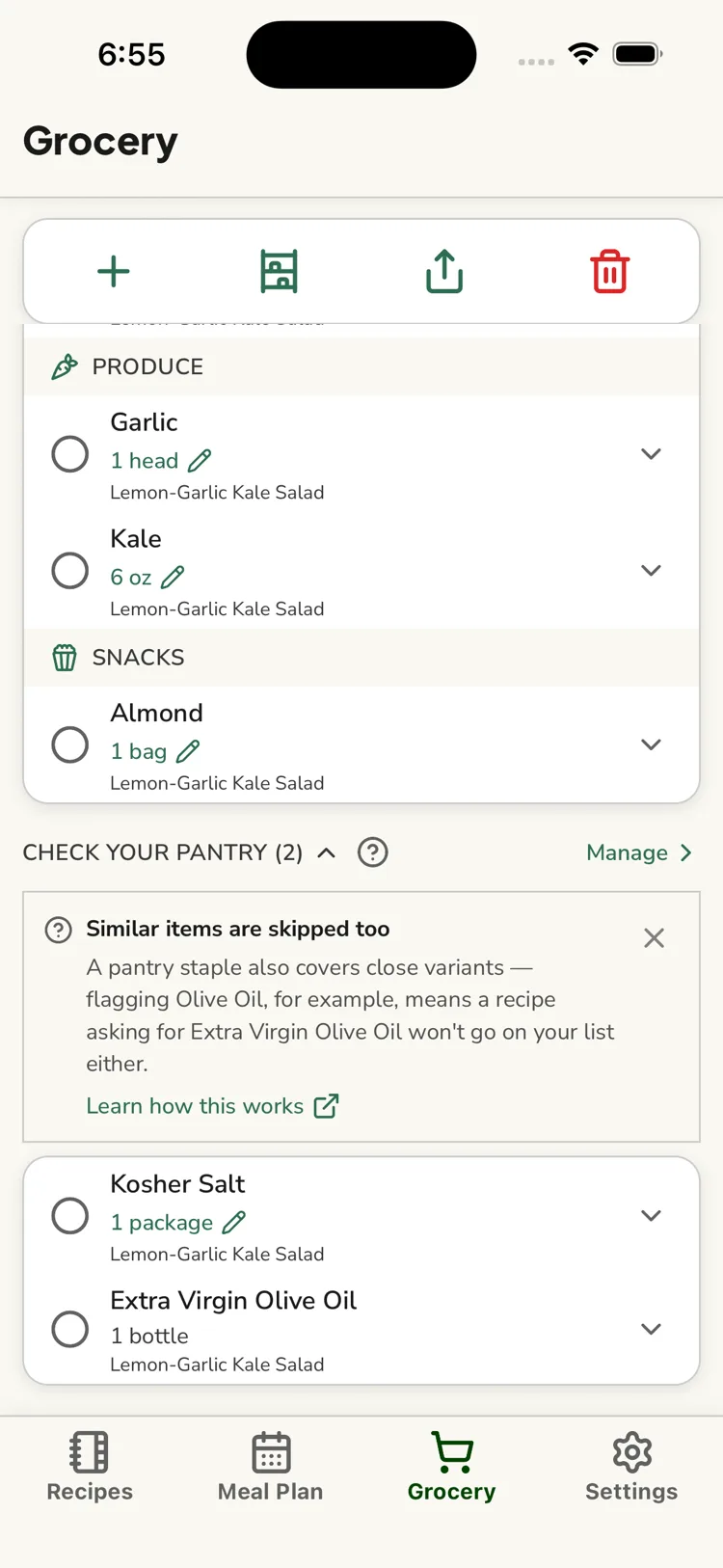
When you build a grocery list from a recipe or a meal-plan week, any ingredient that's one of your pantry staples — or a close variant one of them covers — is put in a collapsible Check your pantry section instead of the main To buy list.
If an item is there because it's a variant rather than the exact staple you flagged, it shows "Covered by your {staple} staple" — for example a recipe asking for Extra Virgin Olive Oil shows "Covered by your Olive Oil staple". See How ReciLore matches ingredients.
Why it's separate
You've told ReciLore you always keep these on hand, so they shouldn't pad out your shopping. But recipes still need them — so ReciLore lists them here as a prompt to glance in the cupboard before you shop and confirm you're not actually out.
Using it
Tap the section header to expand or collapse it, or tap Manage to open the Pantry staples screen. If you are out of something, check it off there so you remember to buy it, or use "ran out" in Pantry staples to move it to the main buy list.
Removing a variant item here (one showing "Covered by…") just takes it off this list — it doesn't unflag the real staple, so it can reappear the next time a recipe mentions that variant. Removing the staple itself does both.
Questions this answers
- What is the "Check your pantry" section on my grocery list?
- Why aren't my staples in the main buy list?
Still need help?
Email us at [email protected] and we'll get back to you.